
Payroll is the reason most contractors hesitate to leave Sage 300 CRE or Sage 100 Contractor. Here’s where things actually stand.
The payroll conversation comes up on almost every Sage Intacct Construction evaluation. A contractor has been on Sage 300 for twelve years. Payroll works. It handles prevailing wage, certified payroll, and union rates. Then someone floats the idea of moving to Intacct, and the first question out of the payroll manager’s mouth is: “What about payroll?”
The thing is, most contractors don't start evaluating new ERP systems because payroll stopped working. Payroll is usually the one thing everyone agrees is working just fine. The conversation starts because the company has grown and other cracks begin to show. Reporting takes too long. Getting answers out of the system gets harder. Teams are working from multiple locations. Executives want better visibility into projects and financial performance.
Eventually, someone starts to question whether an ERP upgrade is the direction they need to go. But that's when the payroll question comes back around. If payroll is the one part of the system that's running smoothly, nobody wants to risk breaking it just to solve problems elsewhere in the business.
When Sage Intacct Construction launched, it didn’t bring the legacy payroll engines with it. Sage made a deliberate choice to keep the platform open and let payroll specialists build the integrations. For a while, nobody had built something that could replace what Sage 300 does.
Good news: that has changed. Today, contractors have payroll options that can support all of their complex requirements of construction while integrating directly with Sage Intacct Construction. So let's look at the most common questions and what the answers look like now.
Does Sage Intacct Construction support certified payroll and prevailing wage?
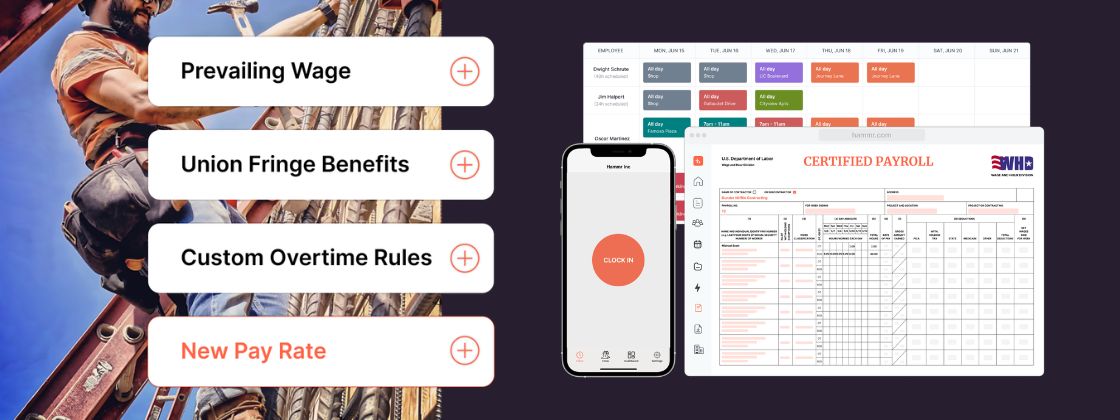
Yes. Certified payroll and prevailing wage are fully supported through Hammr, the independent payroll platform we deploy alongside Sage Intacct Construction.
Hammr uses wage tables; project-level templates that store wage determinations, fringe benefits, and worker classifications by county and trade. When a timesheet hits the system, Hammr reads those tables and calculates wages automatically. The certified payroll reports come out in seconds, not days.
A payroll manager at one of Hammr’s companies got a call from her GC: six weeks of certified payroll reports, needed by morning, or payment would be held another 30 days. She had everything out the door in a few minutes.
The time savings is huge, but not as big as the outcome. Instead of starting the clock on another month waiting for payment, the problem was resolved before it ever affected cash flow. See wage tables set up in real time in our on-demand webinar.

Can Sage Intacct Construction handle union payroll, including multiple unions on a single project?
Yes, Hammr supports multi-union projects. Wage tables in Hammr can be configured for each union and assigned at the project level, so the right rates and fringes follow the right workers automatically. If you have three unions working the same job site, each one stays in its own lane with separate classifications, separate rates, and no manual sorting.
How does construction payroll integrate with Sage Intacct Construction for real-time job costing?
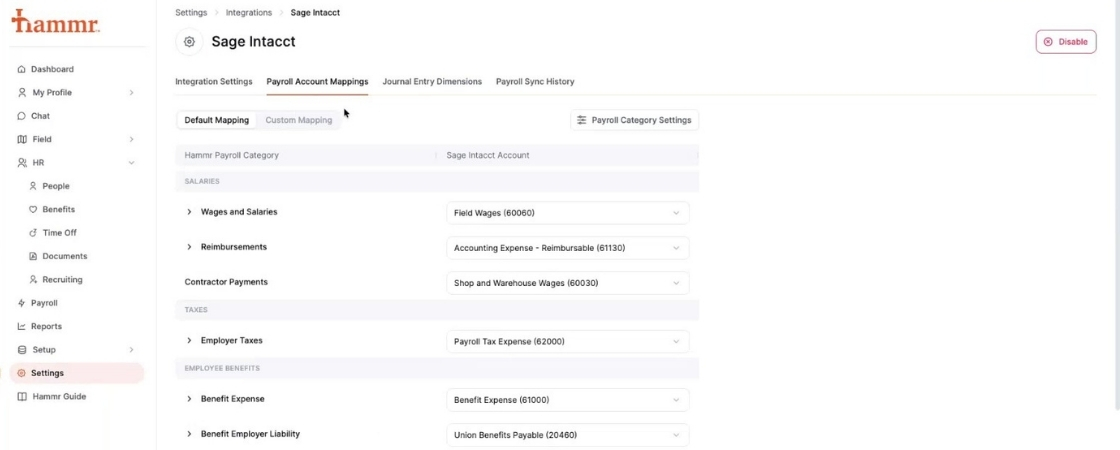
Labor costs sync from Hammr into Sage Intacct Construction at the timesheet level. That means project managers see job cost data as timesheets are approved, not at the end of the pay period or after a manual export. When payroll runs, the entries update to reflect actual paid amounts.
Pay periods that cross month-end are handled through configurable sync triggers. If overtime hours were earned in the last week of May but the pay period closes in June, those costs land in the right period. We’ve worked through this with customers enough times that it’s a known configuration, not a workaround. Watch how this integration works in our on-demand webinar.
Does Sage Intacct Construction payroll meet California labor compliance requirements?
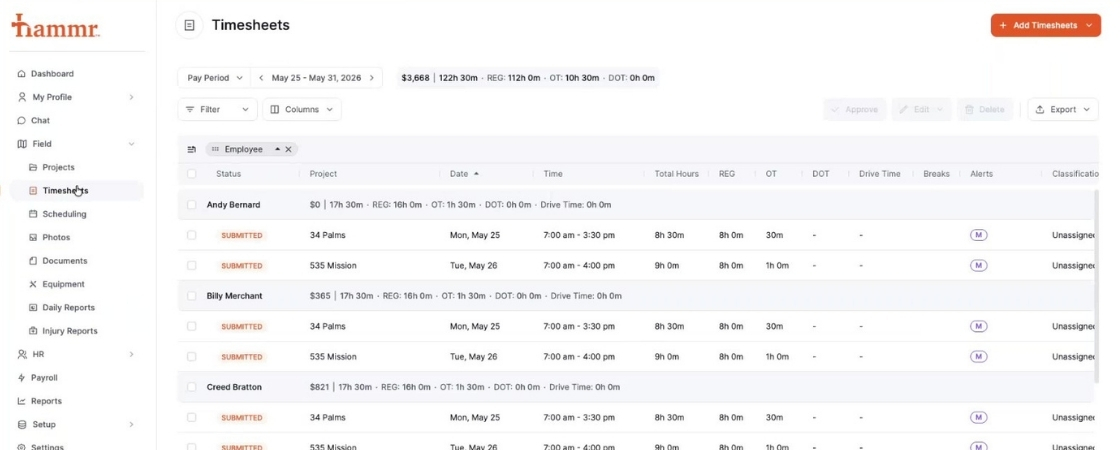
California compliance like break tracking, overtime rules, and meal period enforcement are all built into Hammr’s mobile timekeeping. Workers get automatic break reminders based on hours worked. Clock-out screens include verification questions: Did you take a break? How long? Were you injured today? Those responses are logged.
California is genuinely one of the most demanding labor markets in the country for compliance, and it was a hard requirement we set with Hammr before we started recommending them. If you’re operating in California, ask specifically about break policy configuration during your evaluation.
What happens to payroll staff when construction payroll gets automated?
No one wants to say this out loud in an executive meeting, but it’s the quiet objection that can prevent teams from moving to Sage Intacct Construction. Payroll clerks hear “streamlined payroll” and start wondering if their job is going away.
In a recent implementation, payroll staff were actively pushing back while management was ready to move forward. Their concern was legitimate, if prep time drops from three days to a few hours, what do they do with the rest of the week?
What actually happened: those same employees moved into recruiting support, onboarding coordination, pay application processing, and HR functions the company had been too short-staffed to handle well. Nobody lost their job. The work shifted from grinding through payroll to things that actually move the business forward. That’s been true across every implementation we’ve done.
Can Sage Intacct Construction replace the multiple field and payroll tools a contractor currently uses?
For most contractors, the current setup involves a time capture app, a payroll processor, maybe a separate HR system, and some combination of spreadsheets holding it together. The goal with Hammr and Intacct is to replace that stack with two systems that talk to each other cleanly.
Hammr handles:
- Mobile timekeeping with foreman and supervisor approval workflows
- Prevailing wage and union rate calculation at the timesheet level
- Certified payroll reporting
- California and multi-state compliance
- Daily reports, scheduling, and equipment tracking
- Employee onboarding, benefits administration, and time-off policies
All of that syncs into Sage Intacct Construction. Projects, employees, cost codes, and labor burden are all updated in real time. The spreadsheet in the middle goes away.
Hammr makes payroll a priority for Sage Intacct Construction
Payroll has been the sticking point for Sage Intacct Construction migrations long enough that the hesitation is understandable. But the good news is that the tools exist now. Certified payroll, prevailing wage, multi-union, California compliance, real-time job costing, it’s all there.
If your firm has put off the move because of payroll concerns, or if you’re in the middle of an evaluation and payroll keeps coming up as the blocker, that’s worth a direct conversation. We’ve been through it with enough contractors to know where the real configuration decisions are and what to watch for.
Schedule a Sage Intacct Construction payroll consultation with AVT →
The right foundation for your next stage of growth
Our team of experts is here to help guide you every step of the way. Let’s start your ERP journey today!