

Sage Intacct 2026 release 2 is all about refinement. A lot of the updates build on features Sage introduced over the last few releases, making them more flexible, easier to use, and more practical in day-to-day workflows.
Here are the R2 updates that are most useful for customers.
1. AP automation gets better invoice and receiving visibility
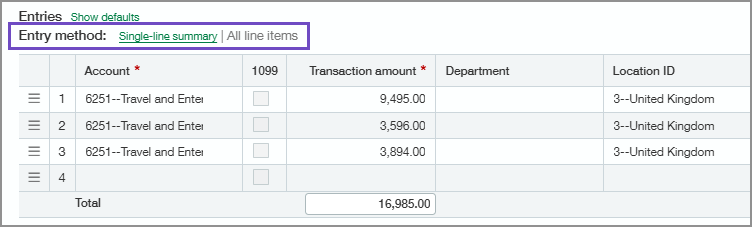
AP Automation now gives you more control over how invoice detail is displayed. For AP bills, you can toggle between line-level detail and a single-line summary after the bill is already in draft.
R2 also improves exception reporting by adding receiver details into the review. You can now compare:
- What was ordered
- What was received
- What was invoiced
That gives AP teams a clearer view of price and quantity differences before posting.

That matters because a lot of AP questions are not just about price. For example, if you ordered five items, received four, and the vendor invoiced you for five at a higher price, you can now see those differences together in the exception summary.
With all contexts in one place, this makes the review process before posting much clearer.
2. Customer refunds can now flow through AP
Customer refunds now connect more cleanly to Accounts Payable.
Once configured, you can issue a customer refund from AR, link or create the related vendor record, and process the payment through AP. That means refunds can follow your normal approval and payment workflow instead of being handled manually outside the system.
This is especially helpful when refunding unapplied credits or customer advances.
3. Billing Groups now support individual charges
Billing Groups already help automate billing for customers with similar schedules. R2 adds individual charges, so you can add one-time or customer-specific charges without disrupting the whole billing group.
For example, if a lawn care customer needs a one-time cleanup before regular service starts, you can add that charge to just that customer.
You can manage these charges from the Billing Group, the customer record, or the new Individual charges menu.

4. Item records now support attachments
Before the update, some teams used Intacct Collaborate as a workaround for item attachments, but that was not always ideal. Now, attachments live directly on the item record where users expect to find them.
Items are used across Order Entry, AR, Purchasing, AP, Inventory, and more. With this update, you can attach supporting documents such as product images, spec sheets, brochures, installation guides, and safety or compliance documents.
This is a simple but useful improvement for teams that need item documentation available directly in Intacct and want to reference those attachments in reports.
5. Fixed Asset Management keeps maturing
Fixed Asset Management continues to get stronger in R2 with several practical updates:
- Summarized depreciation postings to reduce GL detail
- Asset splitting directly from the asset record
- Depreciation reversals for a stronger audit trail
- Revert partial disposals when mistakes need to be corrected
- CIP capitalization date control for better period timing
- Revert CIP capitalization if more costs need to be added later
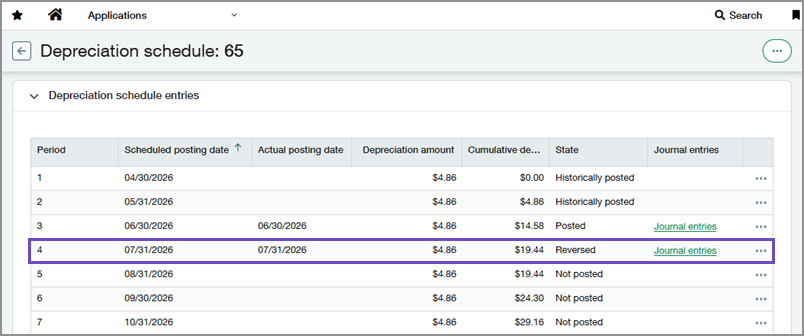
One important caution: some features depend on whether your Fixed Assets correction treatment is set to Reverse or Revert. That setting can affect what actions are available later, so review it carefully before making changes.
If your Fixed Asset module looks very different, you may still be on the legacy module. Sage now offers an upgrade path, but there is a qualification process. Reach out to your Customer Success Manager if you want to explore it.
6. Projects and grants get easier drill-down
Project and Grans financial summaries are now easier to investigate.
You can drill down from summary values into the supporting transactions, which saves time when reviewing project cost, billing, or other project financials.
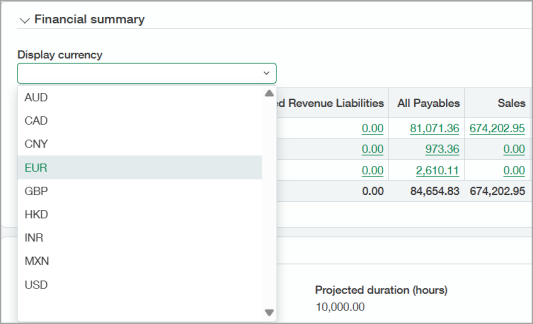
For multi-currency customers, there is also a currency toggle so you can view the summary in the currency that makes the most sense for your review.
7. Construction retainage release expands to project contracts
Construction customers now have another way to release retainage.
You can release retainage directly from the project contract on the Billing Details tab when retainage has been withheld. This is useful when retainage is released in bulk, such as a percentage at practical completion and the remainder after the defect period.
You can still release retainage per invoice line when needed.
8. WIP forecasting connects to primary forecast estimates
This is an exciting one.
Project managers can create a copy of an estimate, update the forecast detail, and mark it as the primary forecast. Then finance can update the WIP schedule using that forecast.
That keeps the detailed forecasting work where project managers need it, while still letting finance manage WIP at the job level.
It is a cleaner connection between cost-level forecasting and the final WIP schedule.
Watch the full Sage Intacct 2026 R2 highlights
Final thoughts
Vendor Payments powered by CSI will be sunset with the R3 release in August. If you are using it, Sage recommends processing payments by July 24, 2026 to avoid issues.
On the roadmap, the items I’m watching include Sage Copilot Cash Intelligence, Finance Intelligence, SaaS Intelligence, AP/Purchasing approval improvements, and Sage HCM (Human Capital Management).
If you have questions about whether one of these updates applies to your environment, reach out t o your Customer Success Manager.
Not currently an AVT customer? Get in touch with our team — we'd love to work with you.



The right foundation for your next stage of growth
Our team of experts is here to help guide you every step of the way. Let’s start your ERP journey today!