

We just wrapped our 2026 Release 1 webinar, and I focused on what you can use right now — not just early adopter features. There’s a lot in this release, so in this blog I’m narrowing it down to my top six updates across automation, fixed assets and projects. Let’s jump in.
1 Line-level purchase order matching & exception flagging
If you’re subscribed to AP Automation, this gets you to truly automated purchasing and AP workflow.
Before this release, Intacct matched invoices to purchase orders at the header level. It would pull in the purchase order lines — but it was still on you to compare the invoice lines to the purchase order.
Now, the Sage AI engine reads the invoice line items, matches them directly to the PO lines, and automatically flags exceptions like:
- Price variances
- Quantity differences
- Lines not on the PO (like freight)
From there, you’re still in control. Whether the bill can post — or needs review first — follows your transaction definition rules and tolerance settings.

2 Automate billing for customers with similar invoicing needs (NEW)
If you manage subscription-like services, this is worth noting. Think of a lawn care company: you mow 50 lawns every week, but you bill customers monthly.
Instead of creating those invoices one by one, Billing Groups let you group customers with similar invoicing needs and apply common charges for faster, more consistent billing.
With Order Entry > Billing Groups, you can:
- Group customers together
- Assign shared charges
- Set a billing schedule
- Auto-generate invoices
- Review everything in a billing history tab

This brings real automation to structured, order-based billing — not just recurring AR invoices. There is a bit of configuration involved, so check out the video for my full walkthrough.
3 AI-powered data imports and updates
Sage Intacct has always had an open API, which means you can integrate with just about anything. Sometimes you just need a faster, cleaner way to get data in — or update it in bulk.
The legacy CSV import templates have worked for years, but let’s be honest — they could feel a little cryptic when errors popped up. This full rebuild of the import experience is a major improvement.
Now, with the new Import Service, you can:
- Import directly from Excel (no more CSV conversions)
- Preview and fix errors before importing
- Mass update master and transactional records more easily
But here’s what really stood out to me: the AI-powered Transform agent. You can use natural language to clean and transform your data import. For example:
- “Split this column into two fields.”
- “Combine these fields.”
- “Remove prefixes.”
4 Fixed asset management: construction in progress
For construction companies, developers, or any capital-intensive organization, this is a big milestone. If you’re coming from Sage 100 Contractor or Sage 300 CRE, you can think of this as bringing CIP-style tracking much closer to what many teams were used to with the Equipment module — but now it’s built directly into Sage Intacct’s Fixed Asset Management.
Here’s how it works:
- Assets can live in a Construction in Progress state
- Costs accumulate in a CIP GL account
- Depreciation doesn’t start until the asset is capitalized
- Once the asset is complete, you capitalize it and move it into the final asset class

And it gets even better from a workflow perspective:
- Create CIP assets directly from AP bills
- Add additional costs to existing CIP assets over time
- Drill into all related bills right from the asset record
- Link CIP assets directly to projects for cleaner tracking end-to-end
If you want to see the setup steps (enabling CIP, adding the CIP GL account, and where it shows up in AP), watch the video.
5 Update project fields in bulk
The new Manage Projects feature lets you update multiple projects at once. This saves a lot of clicks, especially at month-end or year-end when you need to update project status, managers, or other fields across several projects at the same time.
Instead of opening projects one by one, you can:
- Filter your project list
- Select multiple projects
- Click Update Fields
- Apply changes in bulk
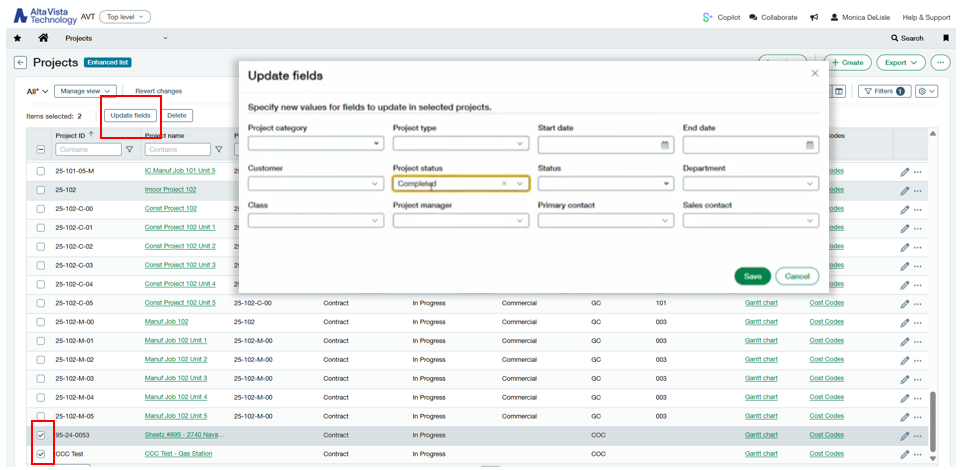
These updates run through the Offline Job Queue, so even if you're updating a large number of projects, the system processes it in the background without slowing you down.
6 Construction: work order management and work order dimensions (NEW)
If you’re a landscaping company, you might run the business in two very different ways at the same time:
- Large residential or commercial landscaping projects that absolutely belong in Projects
- Smaller, repeatable operational work that still needs to be tracked — but doesn’t deserve a full project record every time
That’s where Work Order Management comes in.
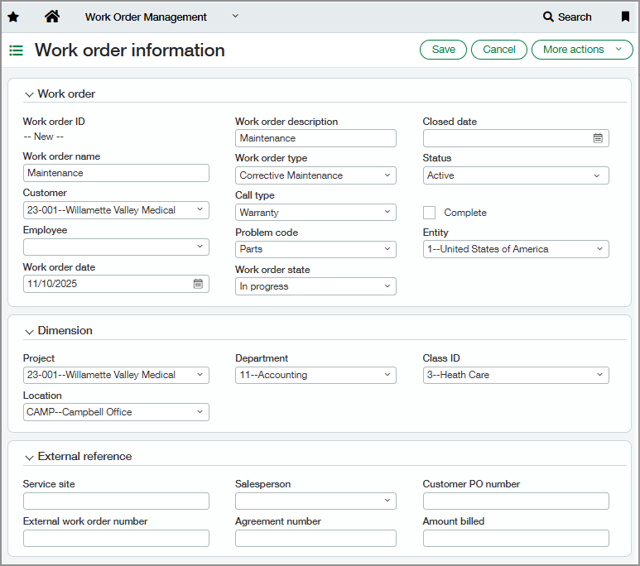
With this release, you can create work orders inside the Work Order Management application (or sync them in from a service management system). Once a work order exists, it becomes a standard dimension you can reference across transactions like:
- Timesheets
- Purchase Orders
- AP bills
So instead of forcing everything into “Project accounting,” you can track service-style work in a cleaner way while still capturing costs, activity, and billing context.
The bigger picture here is integration. The Work Order dimension is clearly setting the foundation for deeper connections between Intacct and service management tools like:
- Sage Field Operations
- ServiceTitan
- BuildOps
- ServiceTrade
Bottom line: it’s a new way to track operational work with better financial visibility. It’s moving us toward tighter alignment between service operations and accounting.
Watch the full Sage Intacct 2026 R1 highlights
There are a few other updates in 2026 R1 that many teams will care about:
- AR Customer Health fields on the customer record (health score, status, at-risk) for better visibility and CRM sync potential
- Dynamic Allocations improvement: use the source account group as the target to simplify allocation setup
- Fixed Asset enhancements including AP adjustments tied to assets and improved reporting options
- Release retainage directly from the commitment for a faster workflow
- Sage Intacct Data Cloud: a new option to securely access Intacct data in Snowflake for analytics and BI
- Roadmap announcements & highlights
If you have questions about permissions or setup, your Customer Success Manager is the best place to start. Until next release, let’s keep making Sage Intacct work smarter for you. Not currently an AVT customer? Get in touch with our team — we'd love to work with you.


The right foundation for your next stage of growth
Our team of experts is here to help guide you every step of the way. Let’s start your ERP journey today!