
.png)
Our Microsoft practice lead Pete D’Herde, and Solution Architect, Kevin Alexander had the privilege of presenting at the 2025 Microsoft Community Summit. One message rang clear: Dataverse isn’t just a connector—it’s a strategic enabler for ERP modernization.
From IT to operations and leadership, this guide helps you understand how to extend Business Central into the Dataverse using virtual tables, avoiding the heavy integration work. As Kevin put it during the session:
“You stream it. Don’t integrate.”
What is Dataverse?
Dataverse is Microsoft’s cloud-based data platform that lets you securely stream and model data across apps without duplicating it.
In their words
Kevin explained it like this:
“Think of having your data available without having to actually create what a lot of us know as true integration. We’re not moving the data between two systems.”
Core benefits

- Real-time access: Data flows live from Business Central into Dataverse.
- Security-first: Role-based and field-level security built in.
- Unified ecosystem: Connect Dynamics 365, Power BI, Power Apps, and even non-Microsoft systems.
- No-code logic: Add business rules and calculations directly in Dataverse.
- Out-of-the-box connectors: Rapid setup for reporting, dashboards, and custom apps.
Virtual tables vs. Synchronized tables
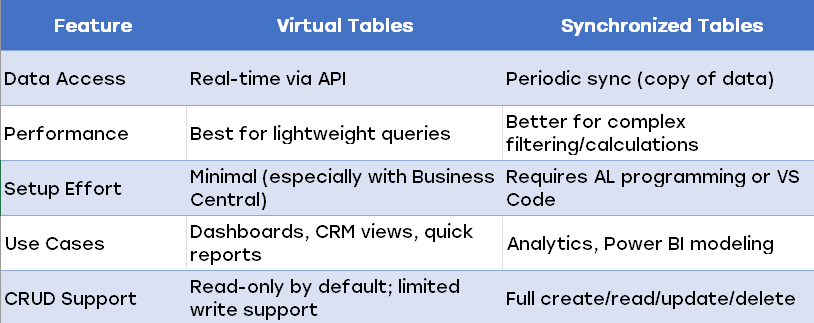
Kevin and Pete broke this down clearly:
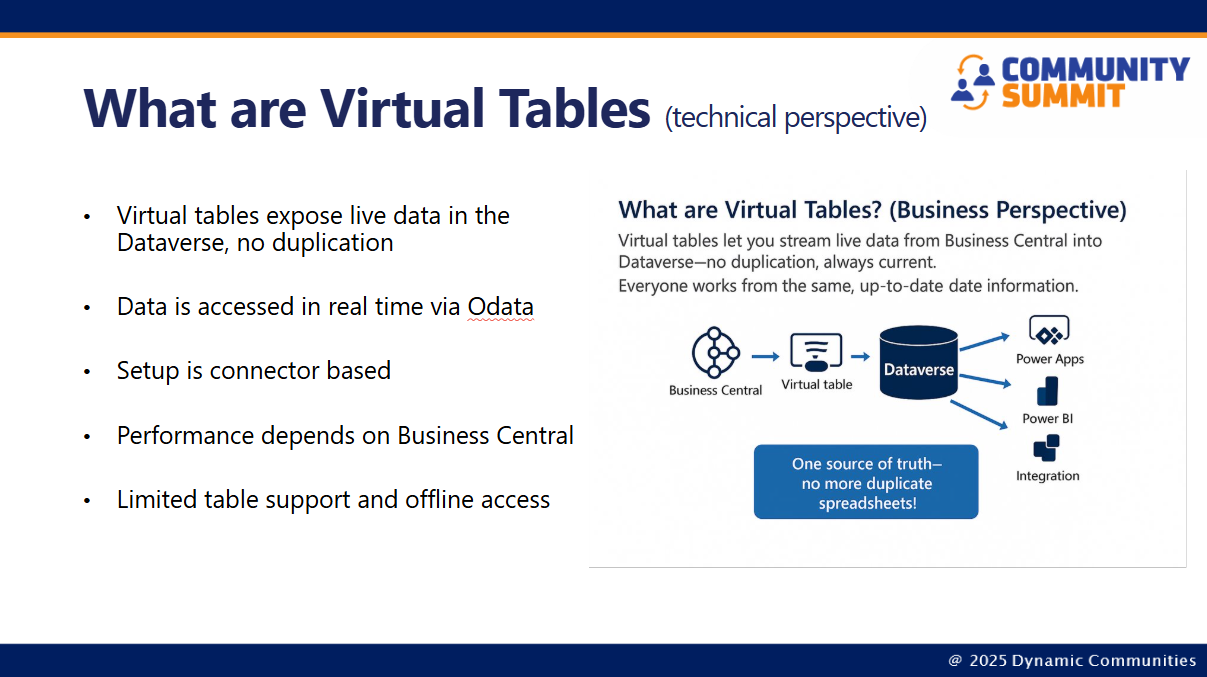
- Virtual tables are great for quick access and tactical reporting.
- Synchronized tables are better for heavy analytics and complex filtering.
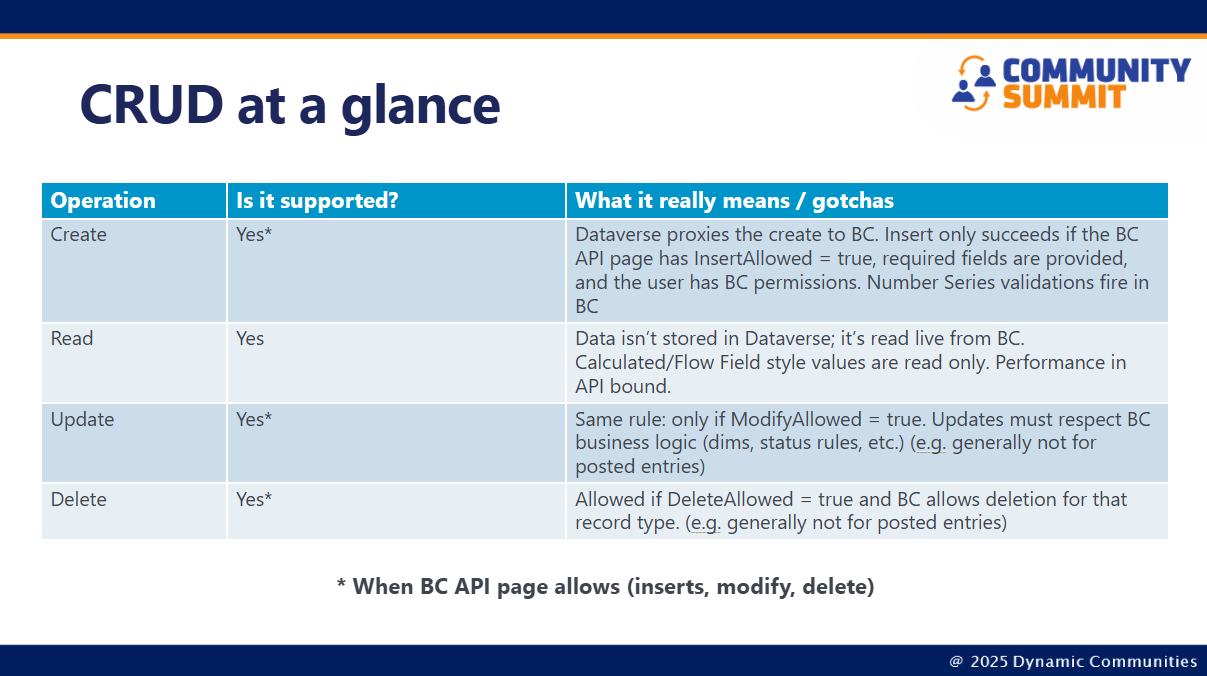
“If the Business Central API allows it, you can do it. If it doesn’t, you can’t.”
How to get started
Kevin’s advice:
“Start with the connector, just the standard tables. I had it stood up in 90 minutes.”
Setup steps
- Spin up a sandbox for Business Central and Dataverse.
- Use Assisted Setup in BC to configure the Dataverse connection.
- Enable virtual tables and install the AppSource extension.
- Select entities to virtualize. Look for tables like Customer, Item, Sales Order Header.
- Build reports or apps using Power BI or Power Apps.
Developer notes: Going beyond defaults
Pete’s technical reminders:
- Syncing tables requires AL code generated from Visual Studio Code.
- Licensing matters: Power Apps ($20/month) + Business Central ($8/month) per user.
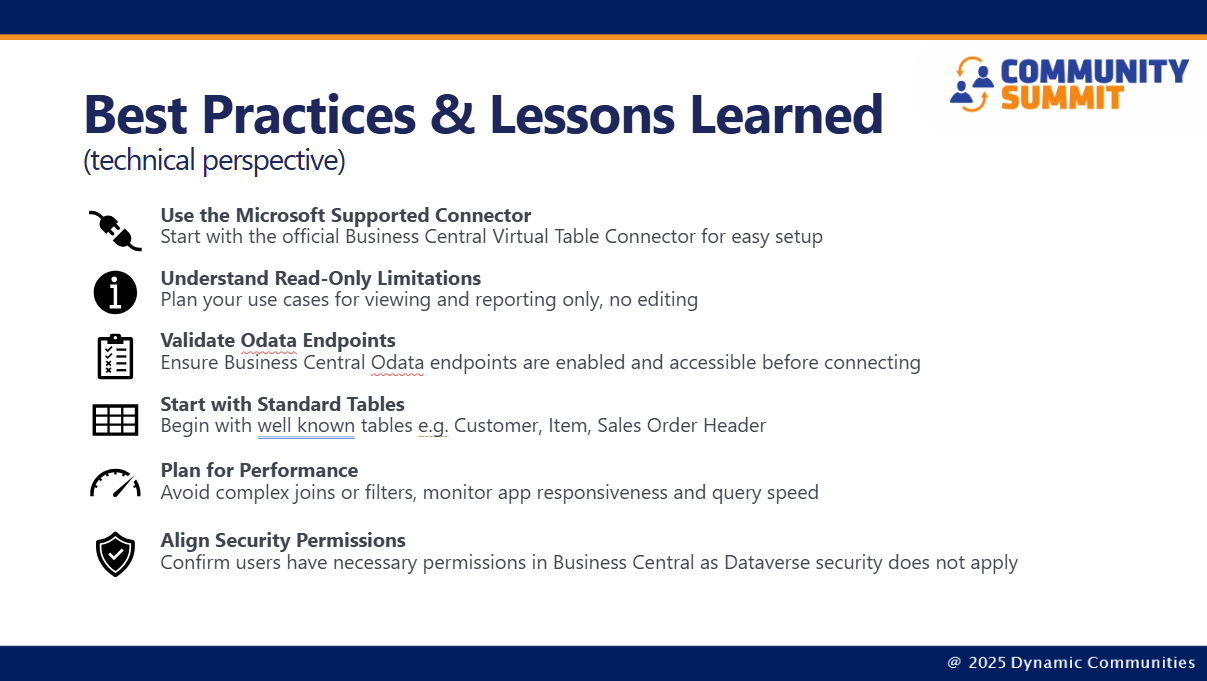
- Security alignment: Dataverse permissions ≠ Business Central permissions. Users must be licensed and exist in BC.
“You’ll hit licensing walls if you don’t plan ahead. Especially with Power Apps and virtual table CRUD.”
Synthetic relationships: modeling across systems
Kevin’s analogy made it click:
“It’s like introducing two people at a party. You’re saying, ‘Hey BC, meet CRM.’”
Synthetic relationships let you link tables across systems, even if they don’t share keys. Great for dashboards, Power Apps, and reporting but not as strict as true database joins.
Use cases that deliver value
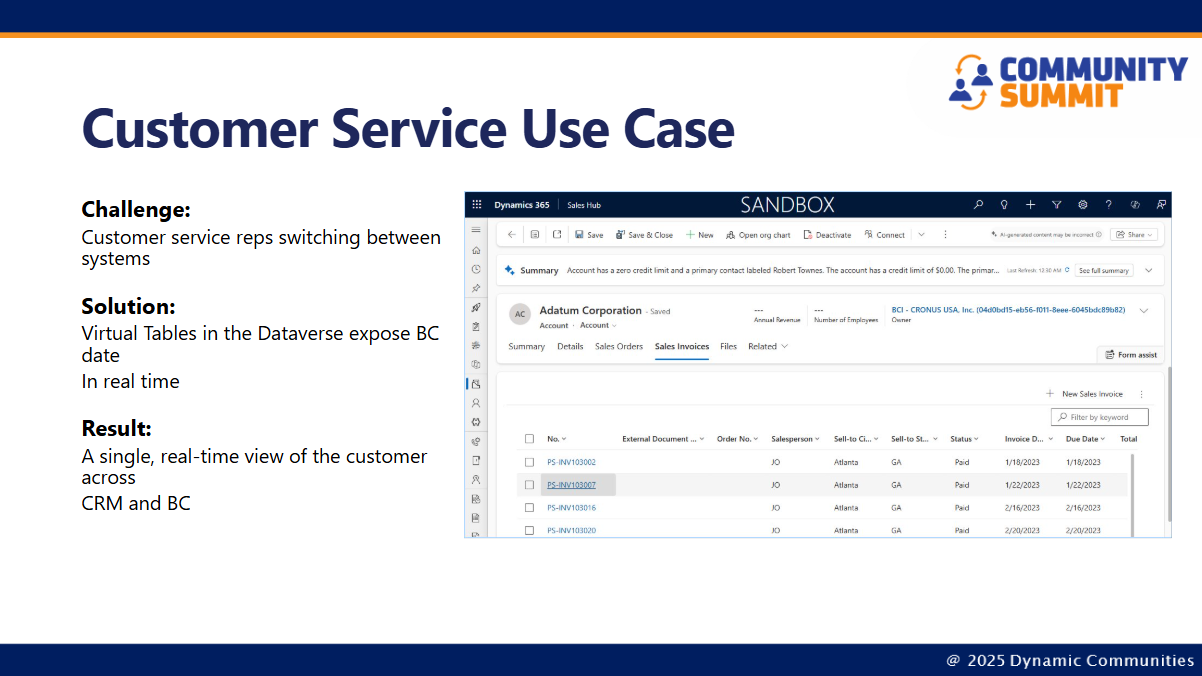
Tactical wins
- Sales dashboards: Stream BC project data into Dynamics 365 Sales.
- Manufacturing KPIs: Display live metrics on plant floor dashboards.
- Inventory lookup: Give sales reps access to stock levels without logging into BC.
- Customer 360 views: Combine CRM and ERP data for unified reporting.
Strategic scenarios
- Power BI reports: Build realtime paginated or interactive reports from Dataverse.
- Custom Power Apps: Use Dataverse as the backend for approval workflows or mobile apps.
- Portal access: Expose BC data via Power Pages for customers or vendors.
- Workflow automation: Use Power Automate to trigger reminders, approvals, or support case follow-ups.
“Executives don’t want to log into ERP, they want dashboards. Dataverse lets you build to your heart’s content.”
Reporting best practices
Pete’s advice:
- Use virtual tables for real-time, tactical reporting.
- Use synchronized tables for analytics and historical data.
- Combine both for hybrid scenarios.
- Limit columns and records, don’t pull everything.
- Do calculations in Dataverse, not in the API layer.
- Monitor OData performance, especially with large queries.
“If you’re doing analytics, use sync. If you’re doing tactical dashboards, use virtual.”
Strategic takeaways for leadership
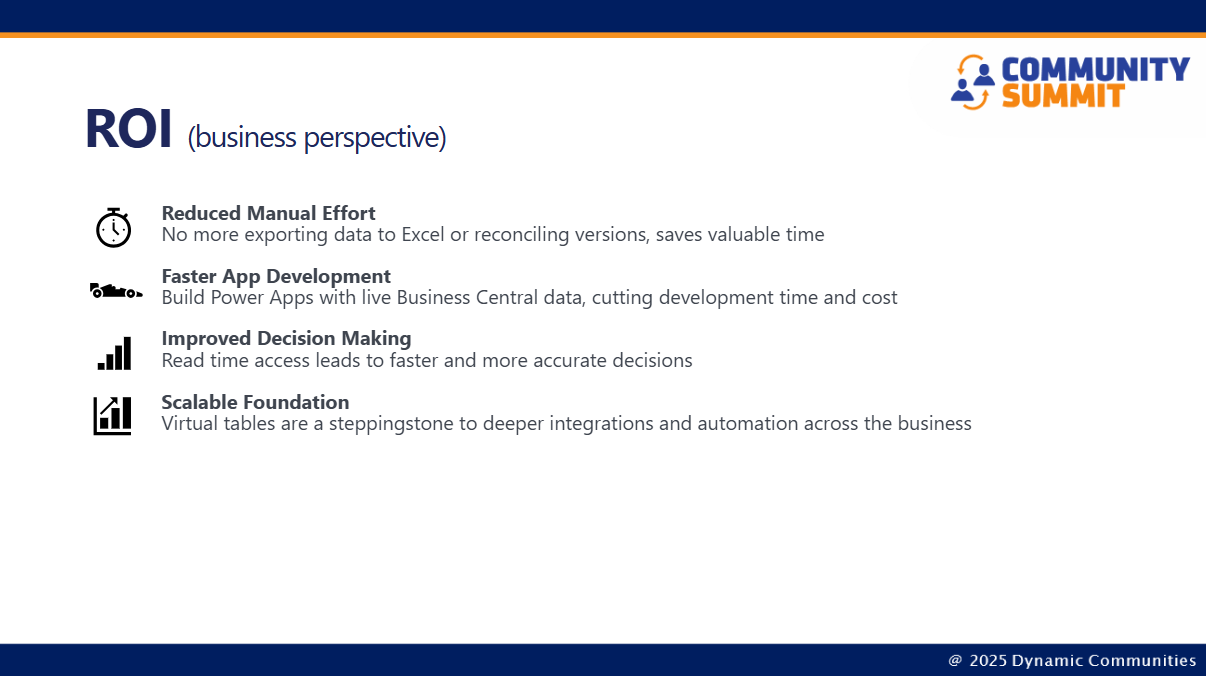
Kevin wrapped it up with a clear message:
- Start simple: Use standard connectors and tables before customizing.
- Accelerate app development: Build CRM extensions or standalone apps faster.
- Expose operational data: Give non-ERP users secure access to live data.
- Think big, stream smart: Avoid traditional integration—stream data into Dataverse and model once.
“Live data access, accelerated development, safe and scalable architecture. Dataverse delivers ROI from day one.”
Action plan for ERP teams
Steps that drive real results
Implementing Dataverse with Business Central isn’t just a technical exercise—it’s a strategic move that empowers your team to deliver faster, smarter, and more scalable solutions. Here’s how each step in the action plan helps your team succeed:
[ ] Configure Dataverse connection in Business Central
This is your launchpad. By setting up the connection, you unlock the ability to stream data securely and in real time. As Kevin said during the Summit:
“Start with the connector—just the standard tables. I had it stood up in 90 minutes.” This step ensures authentication, licensing, and security are handled correctly from the start.
[ ] Enable virtual tables for key entities (e.g., projects, invoices)
Virtual tables let you expose live Business Central data in Dataverse without duplicating it. That means your sales reps, support teams, and analysts can work from the same up-to-date information without logging into BC.
“Do you want to connect to five systems or one? Virtual tables let you centralize your data.”
[ ] Explore synthetic relationships to link ERP and CRM data
Synthetic relationships help you model connections between tables, even if they weren’t designed to talk to each other. This is especially useful when linking CRM accounts to BC customer numbers or combining sales and support data.
“It’s like introducing two people at a party. Dataverse lets you say ‘this belongs to that.’”
[ ] Build Power BI reports using Dataverse as the unified source
Instead of juggling multiple data sources, you can build reports from one place. Whether it’s paginated reports for executives or dashboards for operations, Dataverse gives you flexibility and speed.
“If you want real-time reporting, go to the Dataverse. If you want analytics, use sync.”
[ ] Review licensing and security setup for tactical users
Dataverse doesn’t replace BC security, it complements it. Users need the right licenses and permissions in both systems. Planning this early avoids surprises and ensures compliance.
“You’ll hit licensing walls if you don’t plan ahead. Especially with Power Apps and virtual table CRUD.”
[ ] Monitor performance and iterate based on use case needs
Every business has different data volumes, query complexity, and performance expectations. By monitoring OData performance and refining your setup, you ensure the system stays responsive and scalable.
“Don’t go for the whole nine yards of data. Only get what you need.”
[ ] Consider portal scenarios and custom apps for external access
Want to expose BC data to customers or vendors? Power Pages and custom Power Apps let you do that securely and without granting direct access to your ERP.
“You can start offering customer portals or customer dashboards, without building a full integration.”
This action plan isn’t just a checklist—it’s a roadmap to faster app development, better reporting, and smarter data access. Whether you’re a developer, analyst, or business leader, these steps help you:
- Reduce manual effort
- Deliver real-time insights
- Scale your architecture
- Empower non-ERP users
- Build apps and dashboards faster
You might also like

.png)
The right foundation for your next stage of growth
Our team of experts is here to help guide you every step of the way. Let’s start your ERP journey today!