

The Microsoft Dynamics Business Central Update for 2026 R1 isn't about flashy overhauls, it's about the small changes you feel every single day. Less searching. Fewer clicks. Decisions that happen right on screen instead of in a separate spreadsheet. This wave is squarely focused on reducing friction for finance teams, operations staff, and business leaders who need answers fast.
Here's what you'll actually notice.
1. What's new in the D365 BC 2026 R1 update?
Microsoft did a lot in this release, especially around AI. But rather than covering every technical change, this recap focuses on what matters right away; what finance teams notice during close, what operations teams feel when processing, and what business leaders care about when they need to answer questions quickly.
The full release guide is available at docs.microsoft.com.
A few highlights worth calling out from the full list:
- Self-Billed Invoices: Automatically generate a supplier's invoice upon receipt of a purchase order. No more waiting for them to submit it separately.
- Drop Shipment PO from Sales Order: Create the purchase order directly from the sales order in one step, eliminating the need for requisition worksheets.
- Quality Control Module: Now built into standard Business Central (Essentials and Premium). Covers incoming receipts, production output, assembly lines, and shipping. You can define inspection parameters, apply them to batches or serial numbers, and trigger quarantine procedures automatically.
- Outlook Contact Sync: Keep Business Central contacts in sync with your Outlook contacts automatically.
- Item Variants with Attributes and Images: Variants now support their own photos and attributes, especially useful if you're connected to Shopify or another e-commerce platform.
2. Copilot is now inside your workflow
The biggest shift in this Microsoft Dynamics Business Central Update is where Copilot lives. It no longer sits in a separate panel you have to go find. It shows up inline, on the page you're already working on.
You'll spot it through one of three icons, including what the product team calls the "Copilot Sparkle." On a sales order, clicking the Sparkle lets you ask Copilot to pull quantities and line items from a previous invoice for that customer. You can type your request or speak it. Copilot surfaces the suggestion, and you choose to insert it or discard it. Nothing happens automatically.
This same experience now appears across sales orders, purchase orders, purchase invoices, and journal screens– throughout the entire application.
Most screens also now include an AI-powered summary section at the top. On a customer card, vendor record, item card, or open invoice, Copilot pulls together the most relevant information and presents a quick summary so you understand the current state before taking action. There's also a "more info" button that expands the fact pane with drillable live insights; no report to run, no export needed.
3. AI that follows your approval rules
A common concern with any Microsoft Dynamics Business Central Update that includes AI is control. The short answer: Copilot follows the same workflow and approval rules already in your system.
If a purchase invoice requires approval before it can be released, Copilot won't bypass that. Your approval queue on the role center still shows what's pending for your review. Nothing gets pushed through that a human hasn't signed off on.
If you're already using workflows and approvals in Business Central, this release doesn't change how those work, AI assistance simply operates within those same guardrails.
4. From Business Central to Excel, smarter analysis in minutes
This update closes a loop many finance teams will recognize. The old workflow: run a report in Business Central, export to Excel, manually build pivot tables and charts, share the analysis.
Here's what that same workflow looks like today:
Run your financial report from Business Central and export to Excel. In Excel, click the Copilot icon and prompt: "Analyze this workbook, add data insights, create a new tab called Copilot Analysis, and add a numbered list of insights." Copilot builds it. Follow up: "Create a new tab called Copilot Charts with visuals that highlight key takeaways." Then: "Which items should we address first? Color-code them by priority."
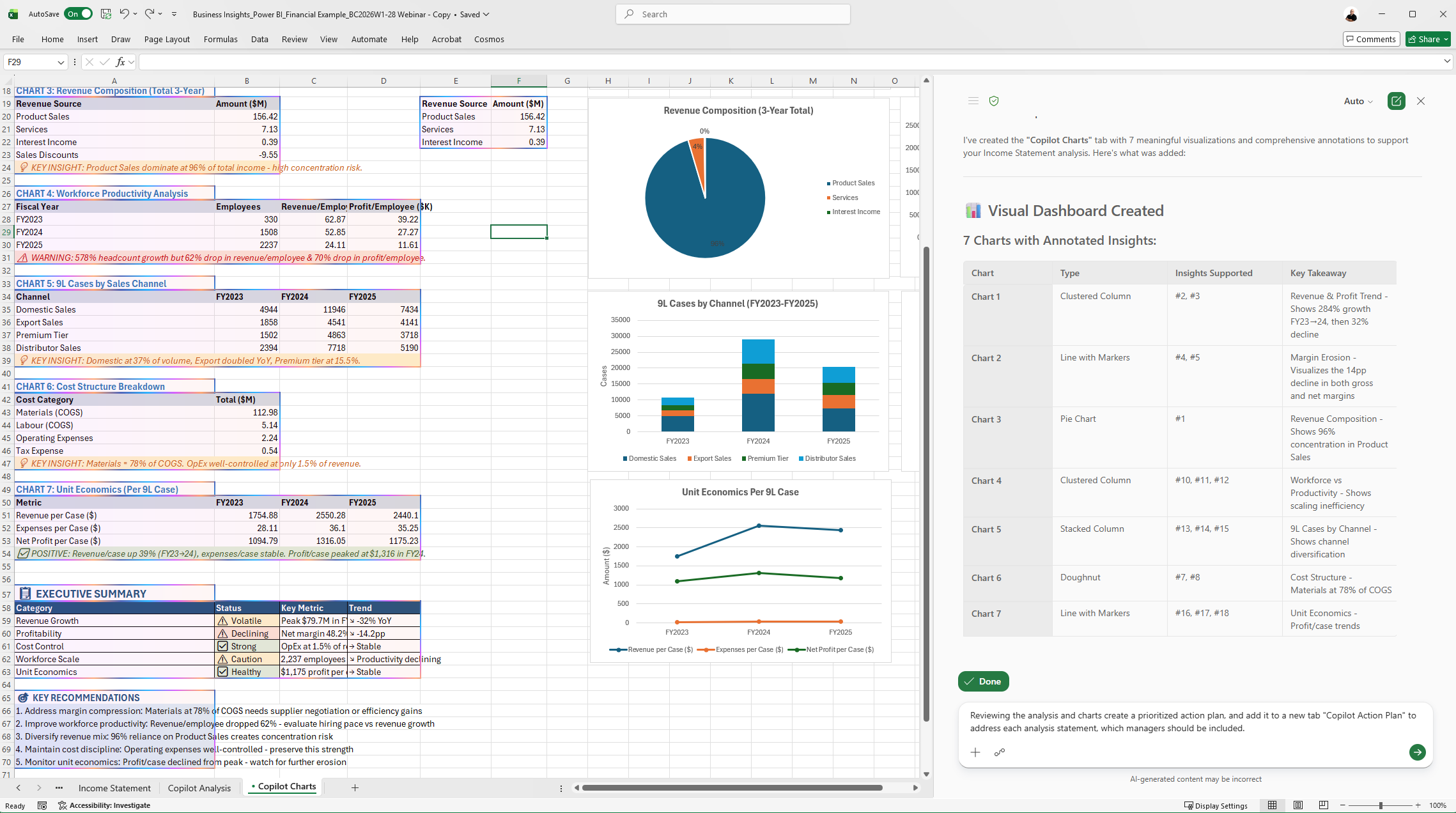
What used to take a few hours now takes minutes. Copilot in Excel automatically selects the best underlying AI model (OpenAI, Claude, Gemini, or others) based on the task — you don't have to decide.
5. The interface feels faster and cleaner
Some of the most welcome changes in this Microsoft Dynamics Business Central Update are the quiet ones:
- Pages load faster
- Lists are cleaner and easier to scan
- You can now see who created or last modified a record directly from a list view — hover over the initials icon to see the name and timestamp
- The Copilot Sparkle appears contextually throughout the app, suggesting next steps relevant to whatever record you're on
These aren't headline features, but they reduce daily cognitive load for every user in the system.
What to do next
Every Business Central environment includes a production instance and up to three sandboxes. A sandbox lets you explore freely — copy your production environment into a sandbox and update it to the latest version without affecting live operations.
If you want to see what's new in this Microsoft Dynamics Business Central Update before your production environment is scheduled to update, that's the place to start. Reach out to your Customer Success Manager or contact the Alta Vista team for help setting one up.
The Microsoft Community Summit takes place this fall in Nashville — a strong opportunity to go deeper on Business Central with hands-on workshops, role-based sessions, and direct access to Microsoft's product team previewing the October 2026 Wave 2 release.
The bottom line: this release is about empowering everyday users. The roadmap is focused on user outcomes — less friction, faster decisions, and AI that works with you rather than around you. If you want to talk through what's most relevant for your organization, reach out to your Customer Success Manager or contact the Alta Vista team.
Frequently asked questions
Q: What is included in the Microsoft Dynamics Business Central Update for 2026 R1?
A: The 2026 R1 Microsoft Dynamics Business Central Update includes inline Copilot suggestions on sales orders, purchase orders, and journal screens; AI-powered record summaries; a new quality control module for Essentials and Premium; drop shipment purchase orders created directly from sales orders; self-billed invoices; Outlook contact sync; and enhanced item variants with attributes and images.
Q: What does Copilot do in the Microsoft Dynamics Business Central Update?
A: In this update, Copilot appears inline on pages you're already working on — not in a separate tool. It can suggest sales order lines based on previous invoices, summarize the current state of a customer or vendor record, and provide contextual insights directly within item cards and open documents. All suggestions require user review before anything is applied.
Q: Does the Business Central 2026 R1 update affect approval workflows?
A: No. Copilot and AI features in this update follow the same approval and workflow rules already configured in your system. If a purchase invoice requires approval before release, that requirement remains in place regardless of AI activity.
Q: Is the quality control module available on Business Central Essentials?
A: Yes. The new quality control module is available on both the Essentials and Premium plans in this release. It supports quality inspections at receipt, production output, assembly, and shipping — with configurable parameters for physical characteristics and automated quarantine triggers.
Q: How do I try the new features before my production environment is updated?
A: Every Business Central environment includes up to three sandbox instances. You can copy your production environment to a sandbox and update it to version 28.0 to explore the new features without impacting live operations. Contact your Customer Success Manager or consultant for step-by-step guidance.
Q: Can Copilot in Business Central create purchase orders from sales orders?
A: Yes. The 2026 R1 update allows you to create a drop shipment purchase order directly from the sales order — eliminating the need to go through the requisition worksheet or order planning separately.

.png)
.png)
The right foundation for your next stage of growth
Our team of experts is here to help guide you every step of the way. Let’s start your ERP journey today!