

Every quarter, I look forward to sharing what’s new in Sage Intacct. The 2025 R4 release has some exciting updates. Here’s a quick recap of the highlights I covered in the live session.
1. Centralized environment to manage financial close
Let’s start with the biggest feature of this release: Close Workspace.
Financial close can get messy fast, especially for private equity firm or any business with multiple entities. Now, instead of juggling spreadsheets and inbox reminders, you get one centralized place to manage the entire process. Your team sees exactly what they’re responsible for, and leadership gets real-time visibility into progress across every entity.
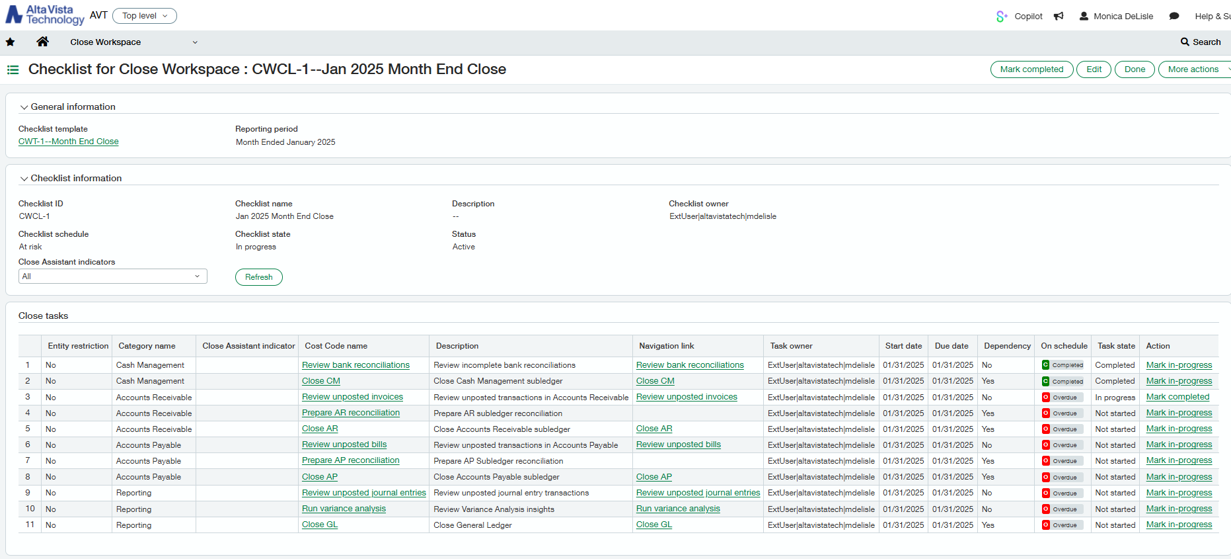
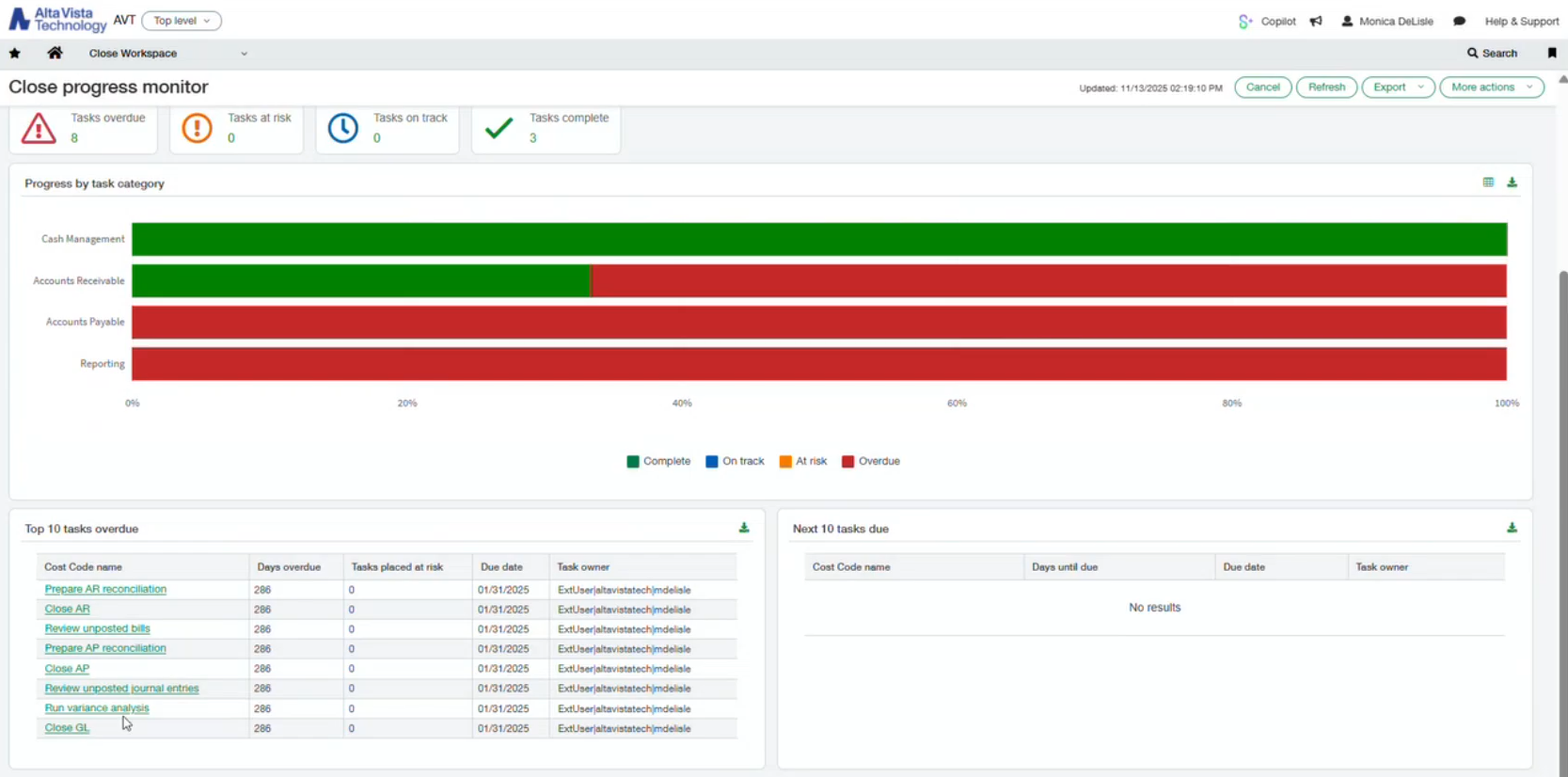
During the webinar, I walked through enabling the subscription, turning on permissions, and building templates. Watch our recording to see how it works:
Close Workspace is part of Sage Copilot automation toolkit. If you see a subscription message when turning it on, just reach out to your account manager and they’ll help you with next steps.
Bonus: Include unposted transactions in General Ledger and Journal reports
With the ability to include unposted transactions in GL and Journal reports, you can see the impact of draft, submitted, or partially approved journal entries before they’re posted. This means stronger support for a continuous close process and faster reconciliation.
2. Enhanced email capabilities for accounts payable automation
If you subscribed to AP automation after May 2025, you are already on the new email domain: @ai.sage.com. Now, it supports auto-forwarding rules, better notifications when documents fail to process, and even iPhone HEIC image files.
If your system still shows @sagemail.com, you’re on the older domain. You can log a support case to opt in early, otherwise all companies will be automatically migrated in February 2026.
3. Manage vendor payments within Sage Intacct
A new embedded payables solution, powered by MineralTree, now lets you pay vendors by ACH, virtual card, or checks — all from your existing bank accounts and without printing anything. Because it’s fully native to Intacct, it uses your current approval workflows and vendor payment preferences, making it an easy way to streamline AP and simplify bank reconciliations.
4. New transaction options for customer statements
We didn’t use to have these three options: Show all transactions / Show open invoices and credits / Show open invoices. You can now choose exactly which transaction types to include in customer statements. It’s a simple but helpful improvement that gives you more control over what your customers see.
5. Employee expense automation now on mobile app
This feature has been available for a while, and it’s now fully supported on the mobile app. Just search “Sage Intelligent Time & Exp.” in the Google Play Store or Apple App Store.
For anyone unfamiliar, Sage Intelligent Time & Expenses is an AI-powered assistant that automates time and expense capture. It gathers activity data from your email, calendar, and desktop usage to suggest accurate, client-linked timesheet entries. All you have to do is review, adjust, and submit — whether you're on your browser or your phone.
For teams constantly on the go, this update delivers real time savings.
6. New project-based tax calculation option for purchasing
Tax rules often depend on where materials are delivered — something we see all the time in construction, nonprofit grants, or any interstate purchasing. Previously, you could set the default tax location on the receivables side, but now that same flexibility is available for purchasing across all three project subscription tiers.
You can set a default purchasing tax district at the project, task, or cost type level, with the ability to override it when needed. This makes sales tax calculation much more accurate and far less manual.

A quick note: this only works if you’re subscribed to the full Taxes application. If you're using Simple Tax, it won’t apply. And in Purchasing Configuration, you need to enable the setting that allows tax district overrides.
7. Enhancements for the construction teams
This release brings several meaningful improvements for our construction customers, and I want to highlight three big ones:
- A more comprehensive view of retainage release information
You’ll now see retainage details in four places for both AP and AR. This added visibility makes it much easier to trace retainage back to the original invoices.- Account Payables: AP Retainage release page & Bill details page
- Account Receivable: AR Retainage release page & Invoice details page
- Overbilling is now allowed on contract lines for AIA/progress billing
This is not the same as overbilling commitments on the AP side. While overbilling isn’t always best practice, it’s something customers have asked for over the years. And Sage is giving you the flexibility to support real-world workflows. - Improvements to Work-in-Progress (WIP)
- You can now include jobs with no cost or billing on the WIP schedule, which is especially helpful for pre-construction or newly signed contracts.
- When a job is complete and you no longer need over/under billing calculations, you can simply select Set project costs to complete or Set billings to complete.
- You can now include jobs with no cost or billing on the WIP schedule, which is especially helpful for pre-construction or newly signed contracts.
8. More flexibility and control in Fixed Asset Management
As the Sage Fixed Asset Management module continues to mature, several capabilities we didn’t have before are now available, reducing the manual workarounds.
Usability improvements:
- Edit asset names after posting
- Edit asset dimensions without needing a transfer
- Change Historical Accumulated Depreciation Setting at any time
Feature enhancements:
- Partially dispose of assets
- Create multiple assets from a single accounts payable bill or invoice line
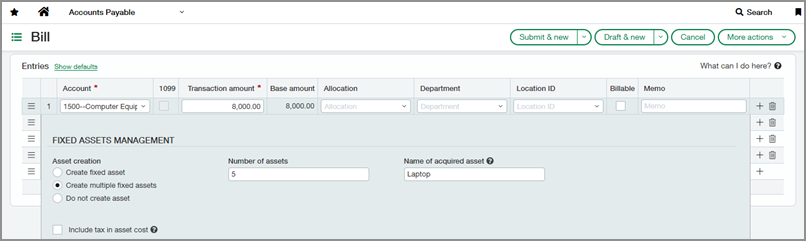
8. Automated equity consolidation method
This update is for organizations using Advanced Ownership Consolidation, which supports more complex ownership structures. For example, if you manage an entity where your organization owns 50% and outside investors own the other 50%, Advanced Ownership Consolidation lets you define those ownership percentages and automatically account for them during consolidation.
With the new automated equity consolidation method, you can now eliminate the outside investor portion directly in your consolidated profit and loss. It’s a clean, accurate way to reflect true organizational ownership in your financial reporting.
9. Introducing historical contracts for faster onboarding
This one is specifically for subscription-based businesses (not projects or construction). Previously, going live with Contracts required detailed historical data— a very time-consuming step. Now, you can simply mark contract lines as historical, enter only the open balances as shown in the screenshot below or import. This enhancement reduces manual effort, improves accuracy, and speeds up implementation.

Sage has also improved automatic renewals for subscription-based contracts and optimized the Contracts menus, so page loading is noticeably faster now.
Reminders and looking into 2026
A quick reminder to update user permissions after each release, so new features show up in your menus. And if you’re still using legacy processors like Authorize.net or PayPal, those were retired. We recommend VersaPay for credit card processing.
Coming soon, we’re very excited about AI-powered PO line matching and project cost breakdown for WIP forecasting. If you'd like to explore any of these early adopters features or share feedback, please reach out to your account manager.
Until the next release update, I wish all of you a smooth and successful year-end close.


The right foundation for your next stage of growth
Our team of experts is here to help guide you every step of the way. Let’s start your ERP journey today!